



Estimated reading time: 5 minutes
Claude-Mem persistent memory finally gives Claude Code (and other tools like Cursor and Codex) agents something most of us have been hacking around for months: actual continuity across sessions and machines. If you spin up an agent for a multi-day refactor or research project and it forgets the architecture decisions from yesterday, you feel it immediately in wasted tokens and repeated explanations. I stood this up on one of my Virtual Machines in Northern Virginia running a dev environment leveraging Dokploy the other week to see how it behaves in a real self-hosted stack.
How the Hooks and Compression Layer Work
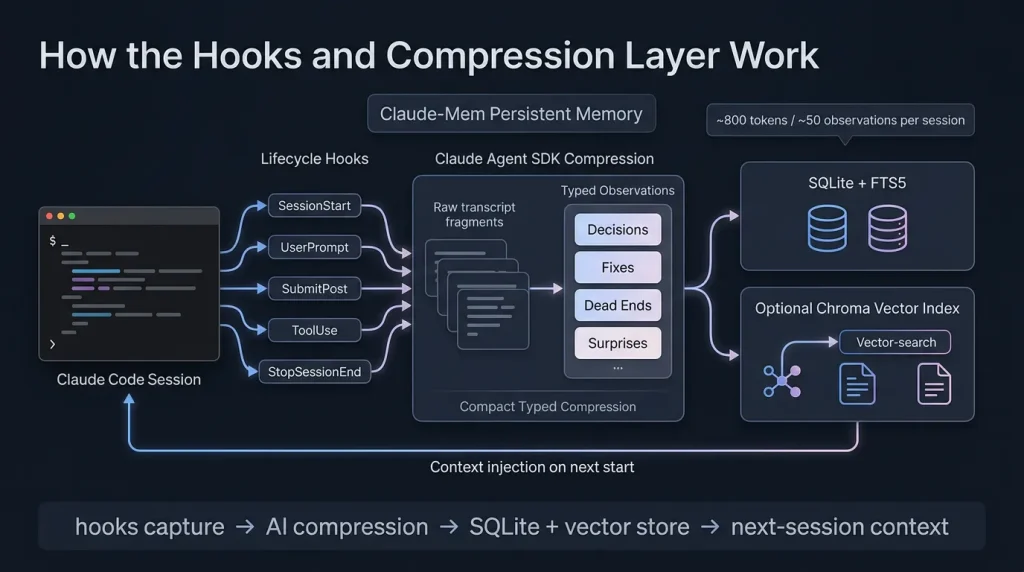
It runs quietly in the background using five lifecycle hooks. SessionStart pulls in context from the last ten sessions. UserPromptSubmit and PostToolUse log what actually happened. On Stop and SessionEnd it hands the raw transcript to the Claude Agent SDK for compression into typed observations — decisions, fixes, dead ends, surprises.
Those observations land in SQLite with FTS5 for fast search plus an optional Chroma vector index for semantic recall. The result is a compact memory store instead of dumping entire chat histories back into every new prompt. Early numbers from the project and community tests show roughly 800 tokens and 50 observations per session, which is manageable.
MCP Tools and the Token-Saving Search Pattern
The real efficiency comes from the MCP server it exposes. Instead of one giant context dump, you get a three-layer workflow: a lightweight search that returns an index, a timeline view for surrounding context, and then targeted get_observations only for the IDs you actually need. That progressive disclosure is where the claimed 10x token savings come from.
You can query your project history in natural language through these tools. It feels closer to having a junior engineer who remembers the last two weeks of work than a fresh context window every time.
cmem.ai Cloud Sync for Cross-Device Use
Local-only is fine for a single machine, but most of us jump between laptop, desktop, and VPS. That’s where cmem.ai comes in. During early access it’s free, no card required. It mirrors your local database behind one private MCP endpoint (something like mcp.cmem.ai/u/your-id). Any MCP-compatible client — Claude Code, Cursor, Gemini CLI, even future agents — can hit that single private link and pick up where you left off on another device.
Latency stays under a second for sync and recall in the numbers they publish. For operators already comfortable with Cloudflare Tunnels and Zero Trust, wiring this in feels natural once you restrict exposure.
Quick VPS Setup Notes
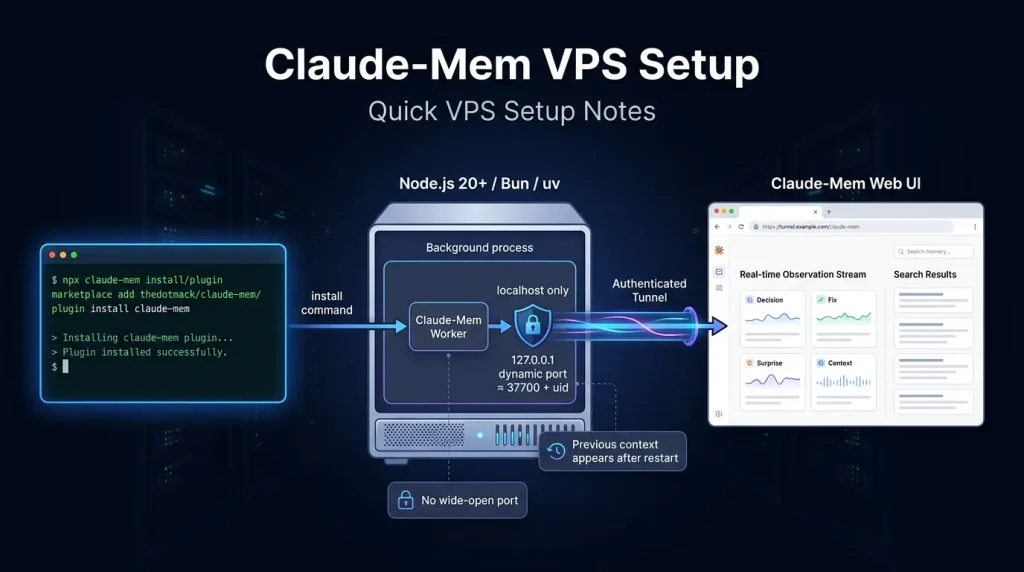
Requirements are straightforward if you already run Node tooling: Node.js 20+, Bun (auto-installed), uv for the vector bits. One command gets you most of the way:
npx claude-mem install
# or inside Claude Code:
/plugin marketplace add thedotmack/claude-mem
/plugin install claude-mem
Restart the IDE or agent and previous context starts appearing. The worker service spins up on a dynamic port (roughly 37700 + uid). I bound mine to localhost and exposed it only through an existing authenticated tunnel rather than opening it wide.
The Security Audit You Need to Read
Before you get excited and point this at production code, go read the February 2026 security audit on the GitHub issues (issue #1251). It rated the codebase HIGH risk overall with four critical findings at the time (v10.5.2). Main concerns: no authentication on the HTTP API, path traversal in several MCP tools, prompt injection risk because stored observations get injected raw, and overly permissive network defaults.
The project moves fast — latest commits are from early June — so some issues may have been addressed. Still, treat it like any powerful local agent tool: run it on a dedicated user, keep the worker bound to localhost or properly tunneled, and don’t feed it secrets you wouldn’t want exfiltrated. I added it to my existing Crowdsec + Zero Trust setup without major drama, but I wouldn’t drop it on a shared or high-value box without extra hardening.
When the Token Savings Actually Show Up
On short one-off tasks you probably won’t notice. On anything that spans multiple days or involves repeated context about architecture, prior fixes, or project conventions, the difference is noticeable. Community reports and the project’s own numbers talk about 95% fewer tokens in some sessions and dramatically more tool calls before hitting limits. That tracks with what I saw once the memory started feeding relevant observations instead of me re-explaining the stack every morning.
Gotchas Worth Knowing
- Updates have broken the plugin for some Windows users recently — check the repo issues before upgrading.
- Setup pulls in Node, Bun, and Python bits via uv. It’s not a single-binary affair.
- The web UI and worker are convenient for debugging but another surface to lock down.
- Early access cmem cloud is free and simple, but team/shared memory features are still coming.
Nothing here is magic. It’s a well-engineered local memory layer with a clean MCP interface on top. The compression and search design are the parts that feel production-grade. The security surface is the part that still needs operator attention.
Bottom Line from the Trenches
If you’re already running self-hosted agents or coding workflows on VPS or colo hardware and you hate re-explaining context every session, claude-mem persistent memory is worth the afternoon to stand up. Start local, read the audit, bind everything down, and see how the token numbers behave on your actual projects. The MCP + cmem path makes cross-device use straightforward once the security basics are handled.
It’s not perfect yet, but it’s one of the more practical steps toward agents that actually remember what they did last week instead of starting from zero every time.
Outbound references: GitHub repo, security audit issue, cmem.ai early access.