

Estimated reading time: 8 minutes
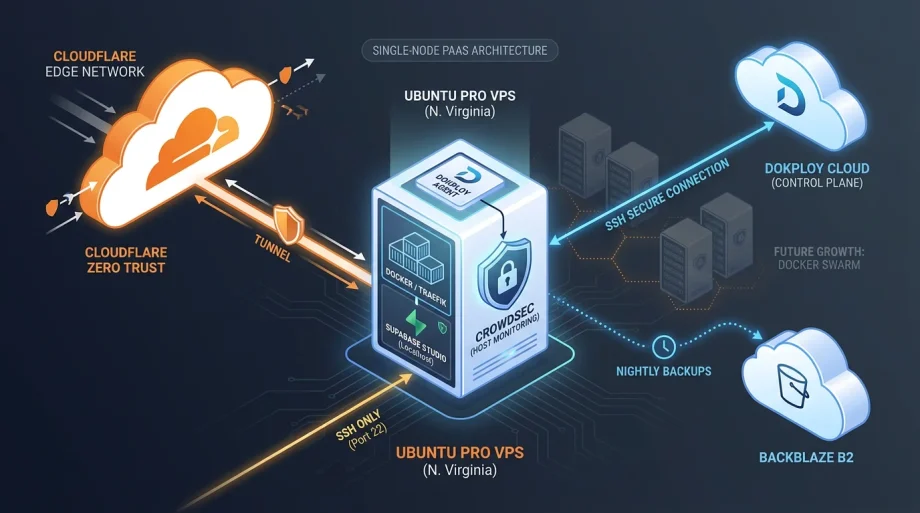
Deploying a Dokploy Cloud single-node architecture does not need to be difficult. I put this together on a LUKS encrypted Ubuntu Pro VPS in Northern Virginia a couple weeks back. Public IP, but the only thing listening from the outside is SSH on port 22. Everything else stays private. Dokploy Cloud runs the control plane. My server handles the containers, Traefik, and the agent. Cloudflare Tunnels plus Zero Trust handle the parts that actually need to be reachable. The Supabase Dokploy template made things a breeze. Supabase Studio sits behind Cloudflare Access and a localhost bind. Backups land in Backblaze B2 every night. Crowdsec watches the host. It is small, deliberate, and built to grow into Swarm later without tearing everything apart. FortiMonitor keeps an eye on just about everything — making sure the lights stay on.
Why Pull the Control Plane Off the Workload Server
Self-hosted Dokploy puts the dashboard, metadata database, Redis, monitoring, and your apps on the same box. That works fine for labs. In production it creates contention you feel when the dashboard or orchestration layer starts competing for CPU and memory during deploys or log collection.
Dokploy Cloud changes the split. The management layer lives on their side. Your VPS becomes a clean data-plane node that runs Docker, your stacks, and Traefik. You still own the hardware, the network posture, and the data. The dashboard just stops being another thing you patch and back up yourself. That separation is the real win when you want predictable resource headroom on the box that actually serves traffic.
Host Hardening Before Anything Else
Start boring. Ubuntu 24.04 image, then immediately:
apt update && apt upgrade -y
pro attach
ufw default deny incoming
ufw default allow outgoing
ufw allow 22/tcp
ufw enable
SSH keys only. No password auth. I also drop Crowdsec on right away because SSH noise is constant and I do not want to babysit logs manually.
curl -s https://install.crowdsec.net | sh
apt install crowdsec -y
cscli collections install crowdsecurity/linux
cscli collections install crowdsecurity/sshd
systemctl restart crowdsec
The point is not the tools. The point is the posture: deny by default, then add only what you need. Every extra open port is future incident response work. I have seen enough of that running production networks to treat it as non-negotiable.
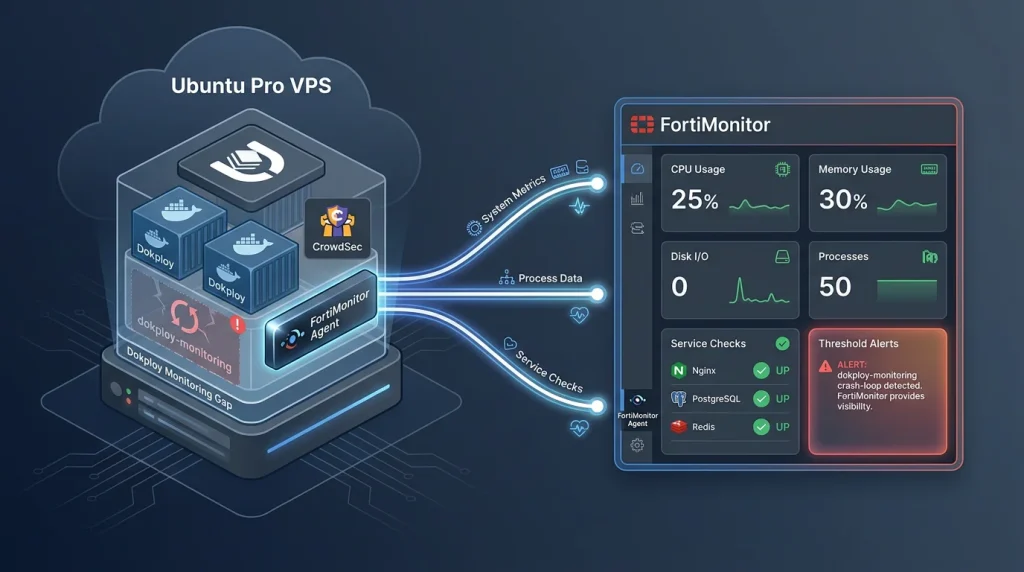
Some FortiMonitor courtesy of Fortinet
For deeper visibility beyond the Dokploy agent and Crowdsec I installed the FortiMonitor agent from Fortinet. It runs lightweight on the VPS, collects system metrics, process data, and custom service checks, then forwards everything to my FortiMonitor dashboard. Setup was simple: download their Linux package, register with the site key in one command, and let it start as a service. It fills the gaps the crash-looping dokploy-monitoring container left (although I did end up fixing that) and gives cleaner threshold alerts without adding much overhead.
Connecting to Dokploy Cloud
Once the host is locked, add it in the Dokploy Cloud dashboard with the public IP, port 22, and your key. The platform reaches out over SSH, installs Docker if needed, drops the agent, and wires up Traefik. No requirement to expose Docker daemon, Postgres, or any application port publicly. The server stays a worker. Dokploy Cloud stays the orchestrator. That boundary keeps the attack surface small and the firewall rules simple.
Cloudflare Tunnel as the Controlled Ingress Path
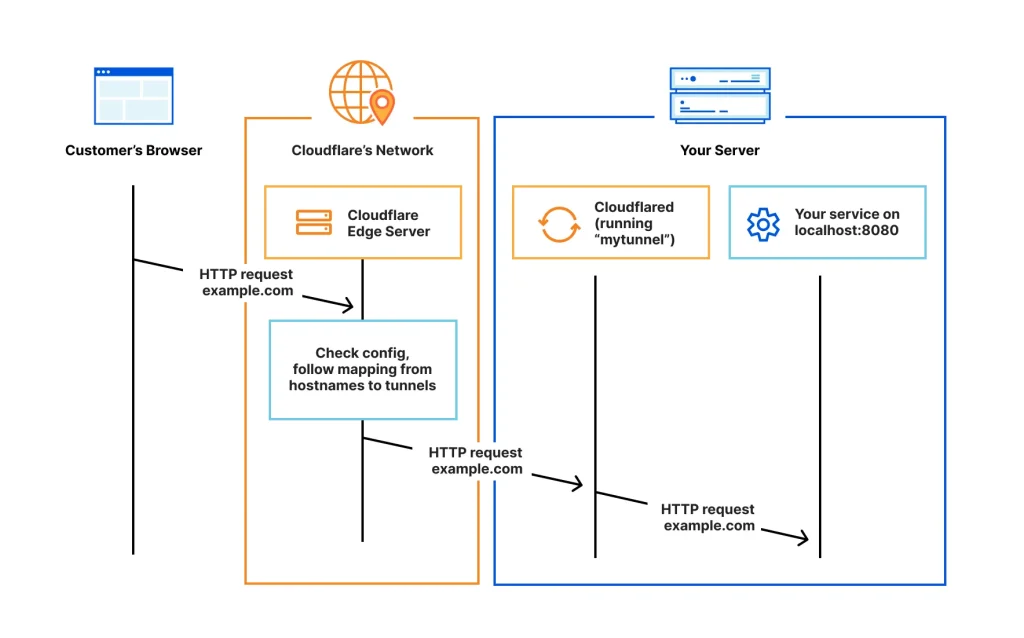
For anything administrative or sensitive I refuse to open host ports. Cloudflare Tunnel runs outbound from the server. Cloudflare terminates the public hostname and applies Zero Trust policies before traffic ever reaches the VPS.
Supabase Studio is the example here. The compose stack binds it only to localhost:
127.0.0.1:3001:3000
After redeploy I confirm with ss -tulpn | grep 3001 that nothing is on 0.0.0.0. The tunnel config then points at that localhost address.
Zero Trust Access sits in front. Policy requires my email domain plus MFA. Random traffic never reaches the server. Cloudflare drops it at the edge. The VPS stays quiet.
Supabase Deployment Choices
I used Dokploy’s Supabase template. It spins up the Postgres, storage, and auth containers through their compose flow. The security move was not “use Docker.” It was refusing to expose services that do not need to be public.
Studio lives behind Cloudflare Access. Postgres stays on the Docker network. No host port mapping for the database. Application containers talk to it internally. Admin work happens through the controlled tunnel path. That is the difference between convenient today and painful during an audit or incident later.
Changing the bind was a one-line edit in the compose definition, redeploy the stack, and verify. Small, reversible, and targeted. I left the rest of Supabase alone.
Traefik Still Matters
Dokploy keeps Traefik as the internal reverse proxy. Cloudflare Tunnel does not replace it. It changes how you reach selected services. For public apps you can still let Traefik handle routing and Let’s Encrypt. For admin dashboards like Studio I prefer the tunnel-plus-Access path because it adds identity enforcement before the request even arrives. Decide per service. Do it deliberately.
Backups That Actually Work
Dokploy schedules dumps to S3-compatible storage. I point them at a private Backblaze B2 bucket. Postgres dumps, volumes, and config go out nightly. That is table stakes.
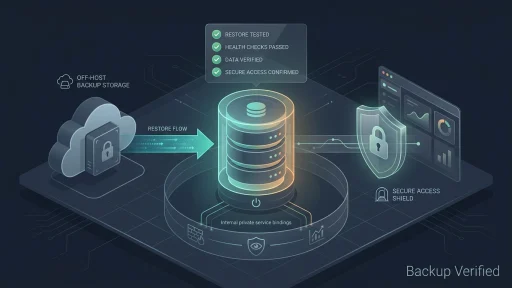
The part most people skip is restore testing. A backup you have never restored is just storage you are paying for. I periodically spin up a throwaway Dokploy project, restore the latest Supabase dump, and confirm the data is usable. It takes thirty minutes and removes the “hope” from the recovery plan. Take a look at the next blog post in this segment about testing backups to ensure you know they work!
Observability and Real-World Caveats
Dokploy’s agent gives container and resource visibility in the dashboard. Cloudflare shows tunnel and Access events. Crowdsec surfaces host-level abuse. For a single node that combination is usually enough on day one.
One note from the actual deployment: the dokploy-monitoring container was already crash-looping before I touched the Studio tunnel work. Unrelated issue, left it alone while I changed ingress. Production writing should not pretend everything is clean. Separate the change you are making from pre-existing noise. Fix the noisy thing on its own schedule. (Note this is fixed as of publication)
Growing into Docker Swarm
The single node is not a dead end. Dokploy supports Swarm. When you need capacity or redundancy you add more VPS instances, join them to the cluster, and move workloads.
Stateless services move first. They are usually just redeploys with updated placement constraints. Stateful pieces like Supabase Postgres or persistent volumes need more thought: volume affinity, replication strategy, or whether an external managed database makes more sense once you are multi-node. The original node can become a manager or worker. Your tunnel and Access rules stay the same because they target the logical service.
You do not throw away the single-node pattern. It becomes the seed of the larger deployment.

Threat Model That Matches Reality
This setup shrinks the public surface to SSH and the Cloudflare edge. Dashboards and databases are not sitting on open ports waiting for scanners. That removes whole classes of drive-by attacks and credential stuffing against admin interfaces.
What remains are the usual operational risks: container image vulnerabilities, leaked secrets in env vars, overly permissive Docker volume mounts, weak application-level auth, and misconfigured Access policies. Cloudflare Tunnel is strong ingress control. It is not application security. You still review images, rotate credentials, and test policies.
Cost and Operational Balance
Dokploy Cloud Hobby tier is $4.50 per server per month. You get the managed dashboard, automatic updates, and basic support. In return you keep the VPS, the data, and the Docker environment under your control. Cloudflare handles protected ingress. UFW and Crowdsec watch the host.
Self-hosted Dokploy removes the fee but adds the work of running the control plane. Fully managed platforms remove more work but usually cost more and take away network and placement control. This middle path fits when you want your own infrastructure without carrying the full platform operations load.
What Production Experience Actually Teaches
Running real networks for years taught me that convenience exceptions become permanent parts of your threat model. Every open port is something you may have to explain at 3 a.m. Every public admin interface is future abuse traffic you will eventually deal with.
This pattern keeps the server public but the services private by default. Supabase Studio has a name but requires authentication at the edge. Postgres never needs to be reachable from the internet. Internal containers talk internally. The operational model stays simple enough to reason about on a single page: Dokploy Cloud manages, the VPS runs, Cloudflare protects, UFW restricts, Crowdsec watches, and tested backups preserve options.
The Repeatable Pattern
Provision Ubuntu VPS. Lock inbound with UFW to SSH only. Configure Hardware Firewall. Key-only SSH. Install Crowdsec. Connect to Dokploy Cloud over that SSH channel. Deploy workloads through templates or compose. Bind databases and internal services to Docker networks, not host ports. Bind sensitive dashboards to localhost only. Publish them through Cloudflare Tunnel. Protect with Zero Trust Access. Send stateful backups to external object storage and actually test restores. Add Swarm nodes later when workload or redundancy justifies the move.
That is how I run secure PaaS-style workloads on infrastructure I control without accepting unnecessary public exposure or taking on the full burden of maintaining a platform control plane myself. It is deliberate, auditable, and ready to grow.