



Estimated reading time: 27 minutes
A complete architecture walkthrough: Docker Compose design, tunnel ingress, proxy trust, edge policy, and a backup strategy that was actually tested.
When you run a billing system, the failure modes that matter most are the silent ones. A challenged webhook that never arrives. A job queue that quietly drops invoices under memory pressure. An Access policy that looks healthy in the dashboard but intercepts every renewal callback. A volume mount that freezes your application at its first deployed version while the container cheerfully reports the new image tag. Revenue stops updating while everything appears green.
We needed a self-hosted Paymenter billing panel reachable only through Cloudflare, with zero inbound ports on the origin, strong path-scoped protection for the admin interface, and data that survives image pulls and redeploys. The stack we landed on is Paymenter running under Dokploy, published exclusively through a Cloudflare Tunnel, with Cloudflare Access gating only the administrative paths.
Before the architecture walkthrough, here is what each piece actually is and why it belongs in this design. This is the foundation for any operator who wants a real zero-attack-surface self-hosted Paymenter Cloudflare Tunnel deployment rather than a tutorial that leaves ports open or webhooks broken.
Too Long to Read? Here’s a Video Overview.
What is Paymenter?
Paymenter is a free, open-source (MIT-licensed) billing and client-management platform built specifically for hosting companies. It is a modern Laravel application (PHP 8.3+, MariaDB, Redis recommended) that automates the full lifecycle of subscriptions, invoicing, payment collection, and service provisioning. It integrates with common hosting control panels—Pterodactyl, cPanel, Plesk, DirectAdmin, Virtualizor, and others—so that when a customer pays, the corresponding service can be created, suspended, or terminated automatically.
Customers get a clean self-service portal for invoices, services, payment methods, and support tickets. Administrators get a modern panel (built with Filament) for products, pricing plans, gateways, extensions, and operations. Payment gateways such as Stripe are first-class. The platform is extensible through themes, a growing extensions marketplace, and a REST API. Official Docker images live on GitHub Container Registry under ghcr.io/paymenter/paymenter with pinned tags (we used a specific v1.5.x release).
Paymenter positions itself as a practical, lock-in-free alternative to commercial systems like WHMCS or Blesta. No per-client licensing fees, full data ownership, and the freedom to run it wherever you want. Because it is a financial system that stores encrypted gateway credentials and drives revenue, every configuration decision around queues, sessions, trusted proxies, and external callbacks carries real money risk. That is why the details later in this post are more opinionated than a typical Laravel application would require.
What is Dokploy?
Dokploy is an open-source, self-hostable Platform-as-a-Service (PaaS) that sits between you and Docker. It provides a clean web interface and API for deploying applications, managing multi-container stacks via Docker Compose, provisioning databases, scheduling backups to any S3-compatible store, and monitoring resource usage. It integrates Traefik for reverse-proxy and certificate management when you want that path, supports multi-server setups, and handles environment variable injection cleanly.
There is a fully self-hosted edition and a Cloud edition (app.dokploy.com). In the Cloud model, the control plane is managed for you while your workloads still run on servers you register over SSH. We used Dokploy Cloud against a single registered remote server. That choice introduced several non-obvious behaviors that actively shape the architecture: mandatory serverId on create calls, compose sources that only materialize on the server at deploy time, random suffixes appended to the appName (which then prefix every volume and network name), and an environment-injection model that writes a sibling .env file next to the compose file before docker compose up.
Dokploy is not merely “Docker with a nice UI.” Its object model (Organization → Project → Environment → Service) and deployment semantics change what you must write in the Compose file and how you configure backups. Understanding those mechanics is essential if you want the stack to be reproducible and the backups to actually contain what you think they contain.
What is Cloudflare in this architecture?
Cloudflare supplies the entire public edge and the Zero Trust controls that let us keep the origin completely dark.
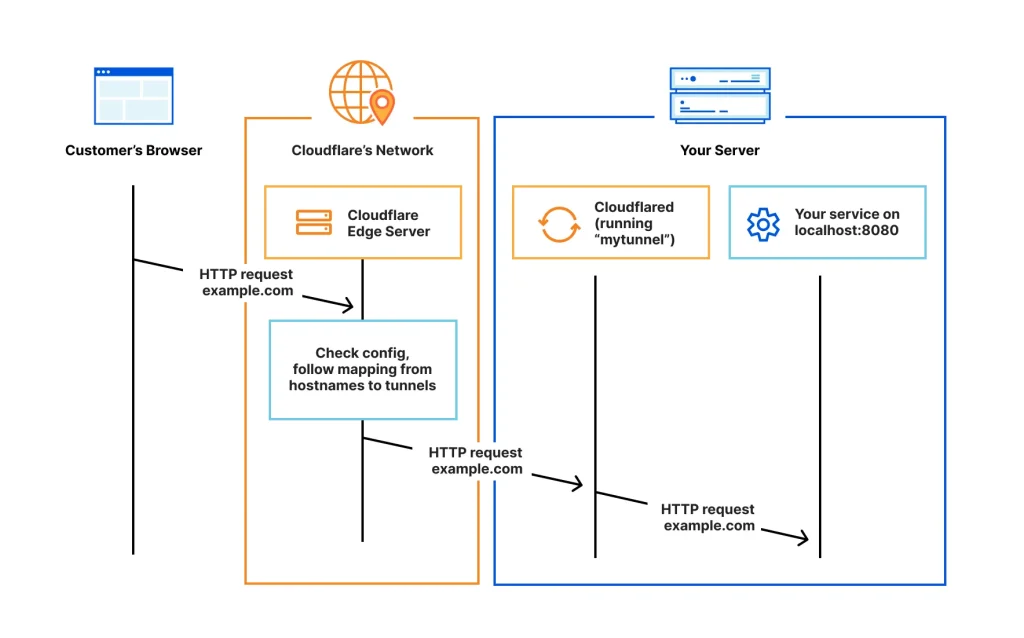
Cloudflare Tunnel (the cloudflared connector) establishes outbound-only, encrypted connections from the origin host to Cloudflare’s global network. Nothing listens on a public interface. There is no inbound port, no public IP exposure on the origin, and no origin certificate to manage. You map public hostnames to local services (for example http://127.0.0.1:8791). Traffic arrives at Cloudflare, is inspected by the WAF, bot management, and cache rules, and only then is forwarded down the tunnel. Modern token-based connectors are usually managed remotely from the Zero Trust dashboard; configuration is pushed live to the running daemon with no local config file and no restart required for most changes.
Cloudflare Access is the identity-aware proxy layer. You define applications by hostname and optional path, then attach policies that require authentication—email one-time codes, SSO via an identity provider, device posture, and more—before a request is allowed to proceed. Scoping Access strictly to the /admin path is critical. Customer-facing routes and payment-gateway webhook endpoints must remain ungated; otherwise renewals silently fail while the gateway reports successful charges.
Together with proxied DNS (CNAMEs that resolve only to Cloudflare), WAF custom rules that skip bot and managed checks for webhook paths, careful cache rules that never serve authenticated content, and Full (strict) TLS mode, Cloudflare becomes the only public interface the billing panel ever has. The origin itself has no attack surface facing the internet.
With Paymenter as the application, Dokploy as the deployment and orchestration layer, and Cloudflare Tunnel plus Access as the sole ingress and authorization plane, we can now look at the concrete architecture that satisfies four hard requirements.
TL;DR
We deployed a self-hosted billing panel (Paymenter, a Laravel application) so that it is reachable only through a Cloudflare Tunnel. The origin binds to loopback. There is no inbound port, no public TLS listener, no reverse proxy route, and no DNS record pointing at the server. The admin panel sits behind Cloudflare Access. Payment gateway webhooks bypass Access and the WAF by design, because the most expensive failure mode in a billing system is the silent one.
The interesting parts of this build were not the happy path. They were:
- Why we deliberately bypassed the reverse proxy that was already running on the box
- Why a stock
docker-compose.ymlfrom the vendor would have frozen the application at its first deployed version, forever - A chicken-and-egg problem in proxy trust that is only solvable from the CLI
- Why the Redis eviction policy in most tutorials would silently delete queued invoices
- Why Cloudflare Access on the wrong path breaks renewals while looking perfectly healthy
- How Dokploy’s service model, naming, and env injection change what you must write in that compose file
Everything below is generalized. Substitute your own domain, tunnel, and bucket.
1. The constraints
We started from four hard requirements:
- All external access arrives via Cloudflare Tunnel. No exceptions, no fallback path.
- No public TLS listener on the host, and no origin certificate. TLS terminates at Cloudflare.
- Application data survives image pulls and redeploys. Code comes from the image, data comes from volumes.
- The admin panel gets a second authentication factor, without touching the customer path.
That fourth requirement is where most tutorials go wrong, and we will come back to it.
2. Architecture at a glance
The single most important property of this diagram: there is no arrow from the public internet to the host. The connector dials out. Nothing dials in.
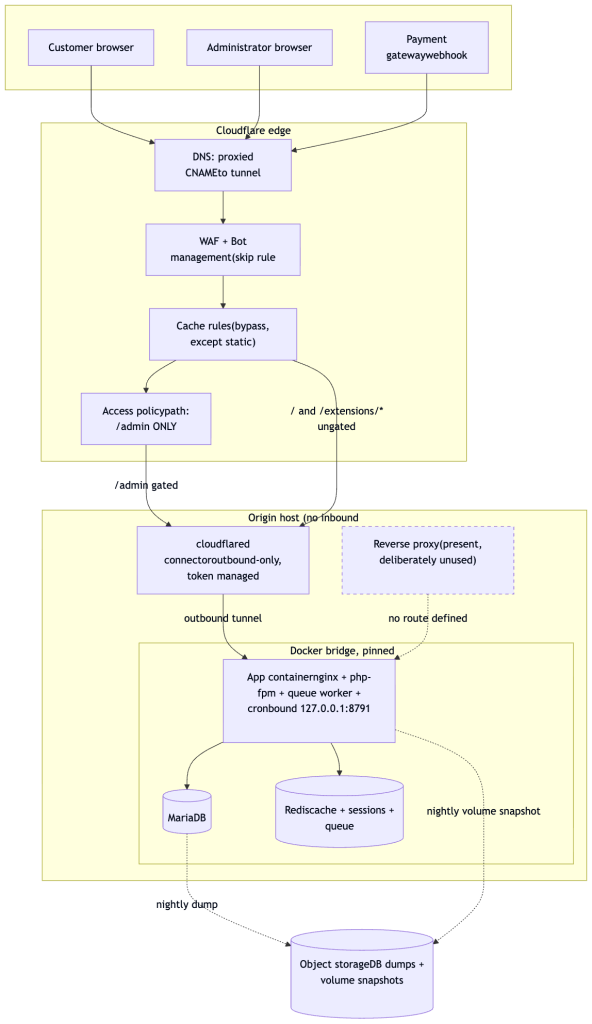
Everything that passes those checks hits an outbound only cloudflared connector on the origin host. Since the tunnel initiates the connection from inside the host, there’s no listening port for an attacker to find. The connector forwards traffic into a Docker bridge network on a pinned subnet, where the app container (nginx, PHP FPM, a queue worker, and cron in one image) talks to MariaDB and Redis, all bound to localhost. A reverse proxy sits in the stack but is deliberately unused, no route is defined for it, kept in place for future flexibility rather than active duty. Nightly jobs dump the database and snapshot the app volume out to object storage for backup.
3. The central decision: bypass the reverse proxy
Our host already ran a reverse proxy (Traefik, managed by Dokploy) for other applications. The obvious move is to add a router for the new hostname and let the proxy handle it.
We did not, and the reason is a discovery rather than a preference.
The proxy was bound to 0.0.0.0:80 and 0.0.0.0:443 on a host with a public IP. If we had added a router matching Host(panel.example.com), then this would work from anywhere on the internet:
curl -H 'Host: panel.example.com' http://203.0.113.10/
That request never touches Cloudflare. It bypasses the tunnel, the WAF, every Access policy, and all rate limiting. It hits the application directly. It also makes the origin trivially discoverable to anyone scanning IP ranges with a hostname wordlist.
Worse, nothing would look broken. The tunnel path would also work perfectly. You would have a silent, permanent bypass of every security control you thought you had configured.
What we did instead
The application publishes to loopback only:
ports:
  - "127.0.0.1:8791:80"
and the tunnel points straight at it. One hop, no proxy, no labels, no ACME.
What this gives up
Reverse proxy middleware: rate limiting, IP allow-listing, auth. In this topology that is not a loss. The proxy sits behind the tunnel, so it only ever sees the connector’s address, not the real client. Every one of those controls belongs at the Cloudflare edge, which is the only layer that sees the true client IP.
A trap worth naming
Dokploy exposes a domain.create API that writes proxy labels and requests a Let’s Encrypt certificate. Calling it here would be actively harmful. The only DNS record for the hostname is a proxied tunnel CNAME, so the HTTP-01 challenge is served by Cloudflare’s edge, not by your proxy. The challenge cannot succeed. You get repeated failed ACME orders, acme.json churn, and eventually rate limiting for the whole zone.
If your origin is only reachable through a tunnel, never attach a certificate resolver to it.
4. Dokploy configuration, end to end
Dokploy is the deployment platform sitting between us and Docker. It is worth understanding its model before the compose file, because several of its behaviours change what you must write in that file.
Know which Dokploy you are running
There are two deployment models, and they behave differently in ways that will bite you:
| Self-hosted Dokploy | Dokploy Cloud | |
|---|---|---|
| Control plane | On your box | app.dokploy.com |
| Your server | Is the control plane | Registered as a remote server, reached over SSH |
serverId on create calls | Optional | Required |
| Compose source on disk | Present from creation | Materialized on the server only at deploy time |
We were on Cloud, managing a single registered server. Two consequences dominated the build.
First: serverId is mandatory on every create call. Omit it and the API has no target server. It returns HTTP 401, and the client library maps that to Authentication failed ... check your DOKPLOY_API_KEY. The credential is fine. We lost real time chasing a key problem that did not exist.
// The field the docs make look optional, and is not:
{ "serverId": "<SERVER_ID>" }
If reads succeed and writes fail with an auth error, suspect a missing required field before you suspect the credential. The fastest way to find the right value is to read an existing working service and copy it.
Second: the compose source directory does not exist until you deploy. On Cloud, /etc/dokploy/compose/<appName>/code> is created on the server at deploy time, not at service creation. Its absence right after creation is expected, and any verification step that checks for it too early will report a false failure.
The object model
Organization
└── Project                    (e.g. "billing")
    └── Environment            (e.g. "production", carries an environmentId)
        └── Service            (Compose, Application, or a managed database)
You attach services to an environmentId, not to a project ID. Grab it once and keep it.
Choosing the service type: Compose, not managed databases
Dokploy offers native MariaDB and Redis service types. We put all three containers in a single Compose service instead. The comparison that decided it:
| Dimension | Single Compose service | App + managed DB + managed Redis |
|---|---|---|
| Built-in DB backup | Available. backup.create accepts backupType: "compose" with a serviceName | Available |
| Volume backup | Available, per volume | Available |
| Internal DNS | Service names on one project bridge: database, cache | Names derive from generated appNames carrying random suffixes, so they are a moving target |
| Subnet control | Pinnable, which is what makes proxy trust deterministic | Attaches to the platform overlay network |
| Password handling | DB_PASSWORD defined once, referenced by both containers | Set at DB creation, then manually copied into the app env. Drift by construction |
| Port control | Literal 127.0.0.1:8791:80 in the file | Routed through the platform’s port abstraction, oriented toward the reverse proxy |
| Startup ordering | depends_on with condition: service_healthy | No compose-level ordering |
| Atomicity | One action brings the whole stack up or down | Three independently versioned services, easy to leave the app running against a stopped database |
The decisive point is the third-from-last row. A single ${DB_PASSWORD} definition consumed by both the database and the application makes password drift structurally impossible. Splitting the stack reintroduces exactly the drift the vendor’s YAML anchor was trying to prevent, one layer up.
The runner-up point: pinning the subnet is what makes the trusted-proxy CIDR knowable in advance instead of discovered after the application is already misbehaving.
Creating the service: a three-call sequence
This is not one call, and the ordering matters.
// 1. Create the shell. Note: there is NO sourceType field on this call.
//    The schema rejects unknown properties.
compose.create {
  name:          "app",
  appName:       "billing-app",          // a random suffix WILL be appended
  environmentId: "<ENVIRONMENT_ID>",
  composeType:   "docker-compose",
  serverId:      "<SERVER_ID>",          // mandatory on Cloud
  description:   "Billing panel, reachable only via Cloudflare Tunnel"
}
// -> returns composeId, and the REAL appName

// 2. Attach the compose file. sourceType defaults to "github" on create,
//    so this call is what switches it to raw YAML.
compose.update {
  composeId:   "<COMPOSE_ID>",
  sourceType:  "raw",
  composeFile: "<the full YAML>"
}

// 3. Inject the environment. This is what provides ${VAR} substitution.
compose.saveEnvironment {
  composeId: "<COMPOSE_ID>",
  env: "APP_KEY=...\nDB_PASSWORD=...\nREDIS_PASSWORD=...\nAPP_TIMEZONE=...\n"
}
Three things people get wrong here:
- Passing
sourceTypetocompose.create. The field does not exist on that call and the schema rejects it. It only exists oncompose.update. - Forgetting step 2 entirely. A service left at the default
sourceType: "github"with no repository will not deploy your YAML. - Putting secrets in the compose file. They belong in
saveEnvironment, referenced as${VAR}.
How environment injection actually works
Dokploy writes a .env file beside the compose file in the same directory, then runs docker compose up. Compose performs ${VAR} substitution from that file before containers are created.
/etc/dokploy/compose/<appName>/code/
├── docker-compose.yml
└── .env                       <- written from saveEnvironment
Two practical consequences:
- Both containers receive the identical literal for
${DB_PASSWORD}, because substitution happens once, before either exists. - Any
$you want to reach the container shell rather than being substituted by Compose must be escaped as$$. This bites in health checks:
test: ["CMD-SHELL", "redis-cli -a \"$$REDIS_PASSWORD\" ping | grep -q PONG"]
Restrict generated secrets to alphanumerics. It avoids an entire class of quoting problems in ${} substitution for no loss of entropy at 32 characters.
The appName suffix renames things you depend on
Dokploy appends a random suffix to your requested appName, producing something like billing-app-a1b2c3. That value becomes the Compose project name, which means it prefixes your volumes and networks:
| You wrote | What actually exists |
|---|---|
app_var | billing-app-a1b2c3_app_var |
app_nw | billing-app-a1b2c3_app_nw |
service app | container billing-app-a1b2c3-app-1 |
Read the real appName back from the API after creation. Never assume it. Volume backup configuration takes literal volume names, and getting them wrong produces a schedule that silently backs up nothing.
docker volume ls --filter "name=<appName>" --format '{{.Name}}'
Backup destinations
Destinations are S3-compatible endpoints defined once at the organization level and referenced by ID. Ours pointed at Backblaze B2.
Two things worth knowing before you configure one:
- Some providers store
regionas an empty string, with the region implicit in the endpoint host. Passing an invented region string fails the connection test. Read back what is actually stored rather than guessing. - The API does not expose bucket visibility or key scope. Whether the bucket is private, and whether the application key is scoped to that single bucket rather than account-wide, must be confirmed in the provider’s console. If the key is account-wide, it can read every other bucket in the account, which quietly undoes any separation you set up.
Test the connection before scheduling anything against it. It turns a silently broken 03:00 job into an immediate error.
Database backups, and a field the API client could not send
backup.create {
  backupType:      "compose",
  composeId:       "<COMPOSE_ID>",
  serviceName:     "database",        // the compose service name
  databaseType:    "mariadb",
  database:        "app",
  destinationId:   "<DESTINATION_ID>",
  schedule:        "0 3 * * *",       // UTC, regardless of app timezone
  prefix:          "app/db/",
  keepLatestCount: 30,
  enabled:         true
}
Our first manual run failed with:
bash: line 15: null: command not found
A null had been interpolated into the generated backup command. The cause: compose-type database backups also need a metadata object carrying database credentials, and the generated API client typed that field as null-only while the real API accepted an object.
We recovered the correct shape by inspecting a backup already working on the same host:
// PostgreSQL, from an existing working backup (peer auth, so no password):
"metadata": { "postgres": { "databaseUser": "postgres_admin" } }

// The MariaDB analogue we applied:
"metadata": { "mariadb": { "databaseUser": "app", "databasePassword": "..." } }
Note that backup.update requires the full object, not a patch. Sending only backupId and metadata returns 400. You must resend schedule, enabled, prefix, destinationId, database, keepLatestCount, serviceName, and databaseType alongside it.
Generalizable lesson: when a generated client cannot express a field, read the platform’s own OpenAPI document, then copy the shape from a resource that already works. Do not invent key names.
Volume backups
One entry per volume, referencing the real, prefixed volume name:
volumeBackups.create {
  name:            "app-var",
  serviceType:     "compose",
  composeId:       "<COMPOSE_ID>",
  volumeName:      "billing-app-a1b2c3_app_var",   // real name, not "app_var"
  prefix:          "app/vol-var/",
  cronExpression:  "0 4 * * *",
  destinationId:   "<DESTINATION_ID>",
  keepLatestCount: 14,
  enabled:         true
}
Cron expressions are UTC and are unaffected by the application’s own timezone setting. We staggered database dumps at 03:00 and volumes at 04:00 so they do not contend.
Expect the resulting object layout to differ from your prefix. Dokploy nests it inside a directory derived from the service name:
billing-app-a1b2c3_database/app/db/2026-01-01T03-00-00Z.sql.gz
billing-app-a1b2c3/app/vol-var/billing-app-a1b2c3_app_var-2026-01-01T04-00-00Z.tar
That is double namespacing rather than the flat app/db/ we expected. Fine in practice, but verify by listing the bucket rather than trusting your configured prefix.
APIs to avoid on a tunnel-only service
| Call | Why not |
|---|---|
domain.create, domain.generateDomain | Writes reverse proxy labels and triggers a doomed ACME order (section 3) |
mariadb.create, redis.create | Splits the stack and reintroduces password drift |
sourceType on compose.create | The field does not exist there |
Two security notes about the platform itself
Environment variables come back in plaintext. compose.one and project.one return the full env blob, secrets included. Any log, transcript, or screenshot of those responses contains your database password and application key. This is platform behaviour you cannot configure away, so treat those API responses as sensitive artifacts.
Services are created with autoDeploy: true and a webhook refresh token. With sourceType: raw there is no git push to trigger it, so it is inert. It is still a live manual trigger surface on a production system, for no benefit. Turn it off.
5. Compose design, and the volume that eats your upgrades
The vendor’s example compose file contained a mount that looked innocuous:
volumes:
  - "app:/app"          # the entire application directory
A Docker named volume is populated from the image only when the volume is first created. After that, the volume shadows whatever the image ships.
So on day one this works. Then you bump the image tag, pull, and recreate. Docker mounts the existing app volume over /app, and your container runs the old code while reporting the new image. Migrations do not run. Bug fixes do not land. docker inspect cheerfully shows the new tag.
The application is frozen at its first deployed version, and the symptom is that nothing appears to happen when you upgrade.
The fix: separate code from data
Drop the root mount. Mount only the subtrees that hold mutable state:
volumes:
  - "app_var:/app/var"                  # .env, and therefore APP_KEY
  - "app_storage:/app/storage/app"      # user uploads
  - "app_logs:/app/storage/logs"
  - "app_themes:/app/themes"
  - "app_extensions:/app/extensions"
Code now always comes from the image. Data always comes from volumes. That is exactly what “survives image pulls” is supposed to mean.
Two notes on this specific layout:
/app/varis mandatory, not optional. The container entrypoint runstouch /app/var/.envunderset -e, and/app/vardoes not exist in the image. Without the mount, the container exits before it starts.- We widened the uploads mount from
/app/storage/app/publicto/app/storage/app. Mounting only the public subtree leaves anything written to a private path inside the ephemeral container layer, where it disappears on recreate. Widening costs nothing and closes the gap.
Pin the network subnet
networks:
  app_nw:
    driver: bridge
    ipam:
      driver: default
      config:
        - subnet: 172.22.0.0/16
          gateway: 172.22.0.1
This looks fussy. It is load-bearing, and section 7 explains why: the gateway address is the value you must declare as a trusted proxy, and you want it knowable in advance rather than discovered by trial and error after the app is already misbehaving.
Pin every image tag
image: ghcr.io/paymenter/paymenter:v1.5.7   # not :latest
image: mariadb:12.3                       # not :lts
image: redis:8-alpine                     # not :alpine
This application runs migrate --seed --force on every container start. With a floating tag, an unattended repull can migrate your production schema without anyone deciding to. Pinning makes every schema change an explicit act.
6. Redis: the eviction policy that eats invoices
We use one Redis instance for three things: cache, sessions, and the job queue. That consolidation is fine. The default configuration advice is not.
Most tutorials suggest:
--maxmemory-policy allkeys-lru
That is correct for a pure cache. It is dangerous here. Under memory pressure, allkeys-lru evicts whatever is least recently used, and it does not know that some of those keys are queued jobs. The result is silently dropped invoices and unsent email, with no error anywhere.
We use:
redis-server
  --requirepass ${REDIS_PASSWORD}
  --appendonly yes
  --appendfsync everysec
  --maxmemory 512mb
  --maxmemory-policy noeviction
noeviction converts silent data loss into a loud OOM command not allowed error that appears in logs and exception traces. For financial data, loud beats silent every time.
Three supporting decisions:
--appendonly yeswith a persistent volume. The queue lives in Redis now. Without the AOF, a restart loses every queued but unprocessed job. Without a volume for it, the AOF is written into the container layer and discarded on recreate, which defeats the point.- Separate keyspaces. Sessions and queue on database 0, cache on database 1. This means “clear the cache” is
FLUSHDBon db 1 and does not log out every customer or delete pending jobs. With everything in one database, the routine cache-clear reflex is destructive. - Set a password even on an internal network. It costs nothing and stops any future container on that bridge from reading every session token in the system.
We also moved the queue driver off the database default. The database queue driver polls with SELECT ... FOR UPDATE once per second, forever, generating constant write load and lock churn on the same database serving customer requests. Redis BLPOP blocks instead of polling.
7. Proxy trust, and a genuine chicken-and-egg problem
Behind a tunnel, the address your application sees is the Docker bridge gateway, not the visitor. Until you fix that:
- Rate limiting collapses every visitor into one bucket, so one abusive client throttles everybody
- Audit logs attribute every action to an internal address, destroying their forensic value
- Fraud checks send an internal IP to the payment gateway and trip its risk scoring
- File uploads fail
In this application, the trusted proxy list is read from a database settings table. There is no environment variable and no config file fallback. So the setting cannot exist until the app is running, and the app misbehaves until the setting exists.
What breaks the deadlock
HTTPS URL generation does not depend on proxy trust. The framework forces the HTTPS scheme based on the configured application URL, not on the request. So setting APP_URL=https://panel.example.com yields correct absolute links from the very first request, before proxy trust is configured. The panel is reachable and usable, which gives you a window to fix the rest.
The correct sequence
Seed the setting from the CLI before the first admin login, so that audit logs and rate limiting are correct from the first authenticated request rather than from tomorrow:
Setting::updateOrCreate(
    ['key' => 'trusted_proxies', 'settingable_id' => null, 'settingable_type' => null],
    ['value' => json_encode(['172.22.0.0/16']), 'type' => 'array']
);
SettingsProvider::flushCache();
The cache flush is mandatory and easy to forget. The settings map is cached with no TTL, so a direct database write is invisible until the cache is cleared. The long-lived queue worker also holds its own stale copy, which is why the flush helper issues a queue:restart as well.
Do not use a wildcard
The wildcard branch trusts whatever address connected. With a loopback-only publish that happens to be safe today, but it means any future container on the same network is implicitly trusted to spoof forwarding headers. Declare the explicit CIDR. This is why we pinned the subnet in section 5.
Verify empirically rather than trusting the theory:
$r = Request::create('https://panel.example.com/', 'GET', [], [], [], [
    'REMOTE_ADDR' => '172.22.0.1',
    'HTTP_X_FORWARDED_FOR' => '203.0.113.9',
    'HTTP_X_FORWARDED_PROTO' => 'https',
]);
$r->setTrustedProxies(config('settings.trusted_proxies'), $headers);
echo $r->ip();          // expect 203.0.113.9, not 172.22.0.1
echo $r->isSecure();    // expect true
The definitive end-to-end check is simpler: upload an image in the admin panel. If proxy trust is wrong, it fails.
8. Cloudflare Tunnel: remotely managed changes everything
Modern connectors are usually run as:
cloudflared --no-autoupdate tunnel run --token <TOKEN>
If that is your setup, the ingress configuration lives at the Cloudflare edge, not on your disk. This has consequences that are widely misunderstood:
| Thing you might reach for | Reality |
|---|---|
Writing /etc/cloudflared/config.yml | Ignored completely. The connector never reads it. |
cloudflared tunnel ingress validate | Parses a local file the connector does not use. Misleading. |
cloudflared tunnel route dns ... | Requires a cert.pem that does not exist in this model. |
cloudflared tunnel login | Not needed. Only obtains cert.pem for CLI management. |
| Restarting the service after a change | Not needed. Configuration is applied live. |
Adding a hostname in the Zero Trust dashboard creates the proxied CNAME for you and pushes the ingress to the running connector. No restart, no dropped connections, and zero blast radius on the other hostnames sharing that tunnel.
Your confirmation signal is in the connector’s own log, which shows the configuration version incrementing:
journalctl -u cloudflared --since "10 minutes ago" \
  | grep 'Updated to new configuration' | tail -1
Verify from that log rather than from the dashboard rendering, because the log shows what the connector actually loaded.
Rule ordering matters
Ingress is evaluated top to bottom, first match wins, and the list ends with a catch-all:
{ "ingress": [
  { "hostname": "a.example.com", "service": "http://127.0.0.1:3001" },
  { "hostname": "panel.example.com", "service": "http://127.0.0.1:8791",
    "originRequest": { "httpHostHeader": "panel.example.com" } },
  { "service": "http_status:404" }
] }
If your new rule ever lands below the catch-all, the symptom is a hard 404 from the edge with no origin request logged. That looks exactly like an origin failure and will cost you an hour.
Two field values worth getting right
Origin scheme. If your origin serves plain HTTP, the route type must be HTTP. Selecting HTTPS makes the connector attempt a TLS handshake against a plaintext socket. It cannot succeed. The failure presents as a 502, which is the same code you see when nothing is listening yet, so it is easy to misattribute.
HTTP Host Header. Set it to the public hostname. The origin’s web server may match any host, but the framework validates signed URLs (password reset, email verification) against the Host header. Omitting this plants a bug that surfaces days later as unexplained 403s, far from its cause.
Expected result before you deploy
Configure the tunnel route before bringing the application up. Then:
curl -o /dev/null -w '%{http_code}\n' https://panel.example.com/
# 502 or 530 = correct. The route exists, nothing is listening yet.
# 404        = your rule is below the catch-all.
# 1033       = the tunnel is not connected.
Doing this first means that when the container comes up, there is exactly one thing left to debug.
9. Edge policy: the silent breakages
This is where a billing system differs from a blog, and where the failure modes cost real money.
Bot protection
Turn Bot Fight Mode off. It challenges non-browser clients. Payment gateway webhook senders are, by definition, non-browser clients. The failure is completely silent from your side: the request never arrives, nothing is logged locally, and subscription renewals simply stop being recorded while the gateway reports successful charges.
If you want bot protection later, it must be preceded by a WAF skip rule for the webhook paths.
WAF
Managed rules can flag legitimate webhook payloads, particularly form-encoded IPN bodies and JSON with signature headers. Create a custom rule at position 1:
http.host eq "panel.example.com"
  and http.request.uri.path eq "/extensions/stripe/webhook"
Action: Skip, covering remaining custom rules, managed rules, rate limiting, and bot management. Leave managed rules enabled for the rest of the hostname.
Confirm the exact webhook path from your application’s route table rather than guessing. A rule that matches nothing looks identical to a rule that works, right up until it does not:
php artisan route:list | grep -i webhook
Caching
The panel is authenticated throughout. Create two cache rules, in this order:
static: cache eligible for/storage/*,/themes/*,/build/*, respecting origin TTLbypass: bypass cache for the whole hostname
Order matters, because rules are evaluated in sequence. Never enable “Cache Everything” on an authenticated hostname. The failure mode is serving one customer’s invoice to another.
TLS
Set the zone to Full (strict) and enable Always Use HTTPS. With a tunnel, the edge-to-origin leg is the tunnel itself and is encrypted independently of the zone SSL mode, so this costs nothing here. It is still correct for the zone as a whole and prevents a future non-tunnel origin from being served over plaintext.
Verify, because this one silently does not apply if you set it on the wrong zone:
curl -sSI http://panel.example.com/ | grep -i '^location'
# expect: location: https://panel.example.com/
10. Cloudflare Access: scope it, or break your revenue
Access in front of the admin panel is the right call. Access in front of the hostname is a disaster, and the order in which you discover that is instructive:
- Every customer login breaks, because Access sits in front of the application’s own auth and customers have no Access identity.
- Every inbound payment webhook breaks. The gateway POSTs with no browser and no cookies. Access returns a login interstitial with a 302. The gateway records a delivery failure. Renewals appear to succeed at the gateway while never being recorded in your system.
So: create a self-hosted Access application with the path field populated.
Subdomain: panel
Domain:    example.com
Path:      admin        <-- not optional
Then verify all three paths explicitly:
# admin must be gated
curl -sS -o /dev/null -w '%{http_code} %{url_effective}\n' -L https://panel.example.com/admin
# expect a redirect to <team>.cloudflareaccess.com

# customer root must NOT be gated
curl -sS -o /dev/null -w '%{http_code}\n' -L https://panel.example.com/

# webhook must NOT be gated
curl -sS -o /dev/null -X POST -w '%{http_code}\n' https://panel.example.com/extensions/stripe/webhook
A useful signal: a healthy ungated webhook path returns 405 to a GET (the route exists but only accepts POST) and 400 to an unsigned POST (your application’s own signature validation rejected it). Both of those come from your application. If you instead see a 302 to cloudflareaccess.com, the path is gated and your gateway deliveries are dead.
Sequence Access last. Adding it while a routing or proxy question is still open makes every unrelated symptom ambiguous.
11. Backups, and why an untested backup is only a hypothesis
Two schedules, to separate object storage from any other tenant’s data:
| What | Schedule (UTC) | Retention | Why |
|---|---|---|---|
| Database dump | 0 3 * * * | 30 | Customer and billing records |
Volume: var | 0 4 * * * | 14 | Holds APP_KEY. Highest value item in the stack. |
Volume: storage | 0 4 * * * | 14 | Uploads |
Volume: themes, extensions | 0 4 * * * | 14 | Customization |
Logs and the Redis AOF are deliberately not backed up. Logs are reproducible noise, and the AOF is a cache and queue, not a source of truth.
The encryption key problem
Laravel encrypts certain database columns, and in a billing panel that includes stored payment gateway credentials. If you restore a database without the matching APP_KEY, you get a working panel whose gateway credentials are permanently undecryptable. There is no recovery.
Two consequences:
- Set
APP_KEYexplicitly in the environment rather than letting the entrypoint generate one, so it is knowable and recordable from the start. - Store it outside the backup system. Our
varvolume snapshot contains the key and lives in the same bucket as the database dumps, so that bucket is not an independent copy. A password manager entry is the actual safeguard.
Note the asymmetry: database, Redis, and root passwords are all rotatable with an edit and a redeploy. APP_KEY is not. Treat it differently.
Rehearse the restore
Download a real object from the bucket and restore it into a throwaway container. Never into the live database.
docker run -d --name restore-test -e MARIADB_ROOT_PASSWORD=tmp mariadb:12.3

# Poll for AUTHENTICATED readiness, not just ping. MariaDB answers
# `mariadb-admin ping` during its init phase, BEFORE the root password is set,
# so a naive readiness check leads to a confusing "Access denied".
until docker exec restore-test mariadb -uroot -ptmp -e "SELECT 1" >/dev/null 2>&1; do sleep 3; done

docker exec restore-test mariadb -uroot -ptmp -e "CREATE DATABASE app;"
gunzip -c dump.sql.gz | docker exec -i restore-test mariadb -uroot -ptmp app
docker exec restore-test mariadb -uroot -ptmp app -e "SELECT COUNT(*) FROM users;"
docker rm -f restore-test
Compare the restored row counts against live. Ours matched exactly: 57 tables, 87 settings rows, 1 user, correct company name and admin email.
Rehearse the redeploy too
This proves requirement 3 from section 1, and it is where we caught a false pass.
Our platform’s “redeploy” action did not recreate containers, because nothing in the configuration had changed. The APP_KEY comparison therefore passed trivially and proved nothing. Forcing a genuine recreate is what actually tests it:
docker compose -p <project> up -d --force-recreate app
Confirm the container ID actually changed, then check that APP_KEY is byte-identical and row counts are unchanged. The row-count check doubles as a test that boot-time seeding is idempotent, which matters a great deal when migrations run on every start.
12. Verification checklist
Run these after deployment. Each one has caught a real problem for us or for someone we know.
# 1. Nothing publicly bound. Expect exactly one loopback line.
ss -tlnp | grep -E ':(8791|3306|6379)\b'

# 2. The reverse proxy has no route for this hostname.
docker exec <proxy> wget -qO- http://127.0.0.1:8080/api/http/routers | grep -i panel.example.com

# 3. From an EXTERNAL machine: the origin must not answer directly.
curl -m10 -o /dev/null -w '%{http_code}\n' -H 'Host: panel.example.com' http://203.0.113.10/
curl -m10 -o /dev/null -w '%{http_code}\n' http://203.0.113.10:8791/

# 4. The pinned subnet actually took effect (trusted proxies depends on it).
docker network inspect <project>_app_nw --format '{{range .IPAM.Config}}{{.Subnet}} gw={{.Gateway}}{{end}}'

# 5. The queue worker is alive. This is the classic silent failure.
docker exec <app> supervisorctl status
docker exec <app> pgrep -a crond

# 6. The queue actually drains rather than only accepting work.
docker exec <redis> redis-cli -a "$PW" -n 0 LLEN queues:default   # expect 0

# 7. DNS resolves to the edge, never to your origin.
dig +short panel.example.com     # expect Cloudflare addresses only
Check 5 deserves emphasis. A crashed queue worker is invisible from outside: the site is fast, pages render, logins work, and no invoice is ever generated and no email is ever sent. Put supervisorctl status in your monitoring.
13. Gotchas we hit, in the order we hit them
The three Dokploy-specific ones are detailed in section 4. Condensed here for the transferable lesson:
A misleading authentication error (missing serverId on Dokploy Cloud, surfaced as a bad API key).
Lesson: when writes fail but reads succeed, suspect a missing required field before you suspect the credential.
A generated API client that could not express a required field (metadata typed null-only, so database backups produced null: command not found).
Lesson: read the platform’s own OpenAPI document and copy the shape from a resource that already works, rather than guessing at an undocumented field.
Object storage layout did not match the configured prefix (nested inside a service-derived directory).
Lesson: verify layout by listing the bucket, not by assuming your prefix is the top level.
A verification that passed for the wrong reason. Our redeploy rehearsal compared APP_KEY before and after a platform “redeploy” action. It passed. It also proved nothing, because the action had not recreated any container: nothing in the configuration had changed, so Compose correctly did nothing. The containers still reported multi-hour uptimes. Forcing a genuine recreate is what actually tested the property.
Lesson: a test that cannot fail is not a test. Confirm the thing you are testing actually happened, by checking the container ID changed, before you trust the assertion that follows it.
Health checks that pass too early. Both MariaDB’s ping during initialization and a container reporting healthy before migrations finish will mislead you. Prefer an authenticated query for databases, and give application containers a generous start_period when they migrate on boot.
14. What we would do differently
- Move the tunnel token out of the unit file. A token in
ExecStartis world-readable and visible inpsto any local user. UseEnvironmentFile=with mode 0600. - Rebind the reverse proxy to loopback. We routed around it rather than fixing it. Any future route created on that host, by anyone, becomes a publicly reachable path that bypasses Cloudflare. We accepted this risk consciously and wrote it down, which is the minimum acceptable way to accept a risk.
- Disable auto-deploy on services with no git source. It is inert without a push trigger, but it leaves a manual trigger surface on a production system for no benefit.
- Alert on queue depth and worker state from day one, not after the first missed invoice.
15. Appendix: the compose file
services:
  database:
    image: mariadb:12.3
    restart: unless-stopped
    environment:
      MARIADB_DATABASE: "app"
      MARIADB_USER: "app"
      MARIADB_PASSWORD: "${DB_PASSWORD}"
      MARIADB_ROOT_PASSWORD: "${DB_ROOT_PASSWORD}"
      MARIADB_AUTO_UPGRADE: "1"
    volumes:
      - "app_db:/var/lib/mysql"
    healthcheck:
      test: ["CMD", "/usr/local/bin/healthcheck.sh", "--connect", "--innodb_initialized"]
      interval: 10s
      timeout: 5s
      retries: 12
      start_period: 30s
    mem_limit: 1g
    logging:
      driver: "json-file"
      options: { max-size: "10m", max-file: "3" }
    networks: [app_nw]

  cache:
    image: redis:8-alpine
    restart: unless-stopped
    command: >
      redis-server
      --requirepass ${REDIS_PASSWORD}
      --appendonly yes
      --appendfsync everysec
      --maxmemory 512mb
      --maxmemory-policy noeviction
    volumes:
      - "app_redis:/data"
    environment:
      REDIS_PASSWORD: "${REDIS_PASSWORD}"
    healthcheck:
      # $$ escapes the variable so Compose passes it through to the container shell
      test: ["CMD-SHELL", "redis-cli -a \"$$REDIS_PASSWORD\" ping | grep -q PONG"]
      interval: 10s
      timeout: 5s
      retries: 6
      start_period: 10s
    mem_limit: 640m
    logging:
      driver: "json-file"
      options: { max-size: "10m", max-file: "3" }
    networks: [app_nw]

  app:
    image: ghcr.io/paymenter/paymenter:v1.5.7
    restart: unless-stopped
    depends_on:
      database: { condition: service_healthy }
      cache:    { condition: service_healthy }
    ports:
      - "127.0.0.1:8791:80"
    volumes:
      - "app_var:/app/var"
      - "app_storage:/app/storage/app"
      - "app_logs:/app/storage/logs"
      - "app_themes:/app/themes"
      - "app_extensions:/app/extensions"
    environment:
      APP_ENV: "production"
      APP_DEBUG: "false"
      APP_KEY: "${APP_KEY}"
      APP_URL: "https://panel.example.com"
      APP_TIMEZONE: "${APP_TIMEZONE}"
      TELEMETRY_ENABLED: "false"

      DB_CONNECTION: "mariadb"
      DB_HOST: "database"
      DB_PORT: "3306"
      DB_DATABASE: "app"
      DB_USERNAME: "app"
      DB_PASSWORD: "${DB_PASSWORD}"

      REDIS_CLIENT: "phpredis"
      REDIS_HOST: "cache"
      REDIS_PORT: "6379"
      REDIS_PASSWORD: "${REDIS_PASSWORD}"
      REDIS_DB: "0"
      REDIS_CACHE_DB: "1"

      CACHE_STORE: "redis"
      SESSION_DRIVER: "redis"
      SESSION_ENCRYPT: "true"
      SESSION_SECURE_COOKIE: "true"
      SESSION_LIFETIME: "120"
      QUEUE_CONNECTION: "redis"

      FILESYSTEM_DISK: "local"
      LOG_CHANNEL: "stack"
      LOG_LEVEL: "warning"
    healthcheck:
      test: ["CMD-SHELL", "wget -q -O /dev/null http://127.0.0.1/ || exit 1"]
      interval: 30s
      timeout: 10s
      retries: 5
      start_period: 120s     # migrations run before the web server binds
    logging:
      driver: "json-file"
      options: { max-size: "10m", max-file: "3" }
    networks: [app_nw]

networks:
  app_nw:
    driver: bridge
    ipam:
      driver: default
      config:
        - subnet: 172.22.0.0/16
          gateway: 172.22.0.1

volumes:
  app_db:
  app_var:
  app_storage:
  app_logs:
  app_themes:
  app_extensions:
  app_redis:
Notes on the file
SESSION_DOMAINis deliberately absent. Unset yields a host-only cookie scoped to the exact hostname. Setting.example.comwould broadcast the session cookie to every current and future subdomain of the apex, which is a genuine cross-application session-leak risk.SESSION_SECURE_COOKIE: trueis set explicitly. Otherwise the framework decides based on the request scheme, which it believes is HTTP until proxy trust is configured, so the Secure flag would be omitted during exactly the window you care about.- Mail settings are absent on purpose. This application overrides mail configuration from database settings, so environment values would be silently ignored. Configure SMTP in the admin panel, or you will have two sources of truth and one of them will be a lie.
- No queue worker or scheduler sidecar. Both already run inside the image under supervisord and cron. Adding sidecars would double-fire scheduled tasks. For the same reason, do not scale this service beyond one replica: every replica would run its own cron and generate recurring invoices N times.
Closing
The architecture is not complicated. One container publishing to loopback, an outbound-only connector, and a small number of edge policies. What makes it worth writing down is that almost every serious failure mode here is silent: the frozen application that reports a new version, the evicted job queue, the challenged webhook, the gated callback path, the backup nobody ever restored.
The design principle that follows is simple. Prefer configurations that fail loudly. Then go and verify the ones that cannot.
If you are running any self-hosted system that touches money or customer credentials, treat the verification checklist and the restore rehearsal as non-negotiable. The difference between a hypothesis and a working backup is whether you have actually restored it.